Load Data CSV Errors
Symptom: CellProfiler fails with “Unable to load image”
Solution: Validate CSV paths are accessible:
# Check CSV format
head load_data.csv

# Verify image paths exist
cat load_data.csv | cut -d',' -f5 | xargs -I {} test -f {} && echo "OK"
Plugin Not Found
Symptom: “Plugin ‘callbarcodes’ not found”
Solution: Ensure plugin URL is accessible and pipeline has access to the internet if plugin is loaded from an online source.
Memory Errors
Symptom: CellProfiler crashes with out-of-memory. Exit code 137 means that a process failed from insufficient memory.
Solution: Increase process memory or reduce image size.
To reduce image sizes for steps 1-3 or 5-7 (all of the CellProfiler steps before the final Analysis pipeline), image size needs to be reduced before the Nextflow pipeline is triggered. Create a pipeline (CellProfiler, FIJI, Python, or otherwise) to rescale or crop your images and then adjust your samplesheet to point to the smaller images as input. To reduce image sizes for step 9 (the final Analysis pipeline), change the image scale/crop parameters that are passed to steps 4 and 8. Specifically, increasing tileperside will reduce image size because the whole-well stitch will be cropped into more, smaller images.
To increase process memory, you can edit the nextflow.config file. Alternatively, in Seqera Platform, in the Launchpad, in the 3) Advanced settings tab, under Advanced options you can add in process information that will supercede configuration defined elsewhere. (See Nextflow documentation for more on configuration order of priority.) e.g.
process {
    withName: 'POOLED_CELLPAINTING:BARCODING:CELLPROFILER_ILLUMAPPLY_BARCODING' {
        memory = 4.GB
        cpus = 2
    }
}
Missing Images
Symptom: CSV has fewer rows than expected
Solution: Check filename patterns match exactly:
ls test_images/ | grep -E "P[0-9]+_[A-Z][0-9]+_[0-9]+_[0-9]+_.*\.tif"Metadata Mismatches
Symptom: CellProfiler can’t group images properly
Solution: Ensure metadata columns are populated correctly:
df[['Metadata_Plate', 'Metadata_Well', 'Metadata_Site']].drop_duplicates()Changes to the Nextflow codebase are not reflected in your Seqera Platform run
Symptom: A resumed or relaunched pipeline does not include changes made to the Nextflow workflow codebase since the last launch.
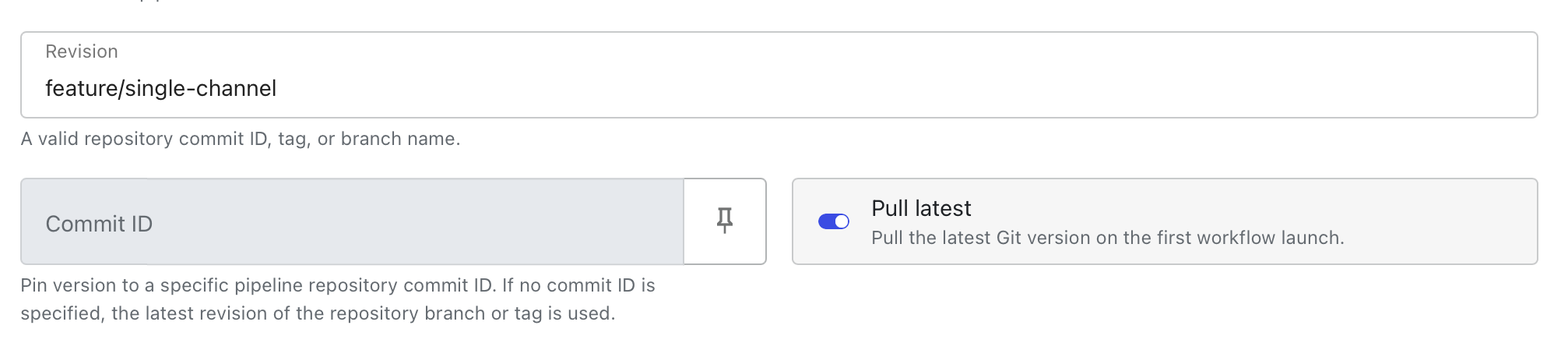
Solution: In Seqera Platform, in the Launchpad, in the 1) General config tab, under Run setup, make sure that Revision is pointing to the branch that you are working off of and not a specific commit. Make sure that Pull latest is set to True (toggle is to the right and shows blue).
Cant run multiple subsets of wells/images from single plate
Symptom: Triggering independent runs using separate subsets of wells/images from a single plate makes it so that runs cannot be resumed but instead start from the beginning.
Solution: You cannot process two separate subsets of wells/images from a single plate in independent runs because there are some files that are created on a per-plate basis (e.g. illum .npy files). Therefore the output of one workflow trigger will overwrite the output of the other and since files are overwritten, Nextflow starts the workflow over upon resumption. To get around this, you must use different “Plate” metadata in your samplesheet (e.g. Plate1_subset1 in one samplesheet and Plate1_subset2 in the other samplesheet instead of just Plate1 in both samplesheets).
-resume reuses a result you didn’t expect
Symptom: You change an input (a .cppipe file, --cellprofiler_flavor, --cellprofiler_container_override, etc.) and re-run with -resume, but a process you expected to re-execute (e.g. CELLPROFILER_SEGCHECK) is reported as cached instead.
Cause: -resume matches each task against its entire work/ directory history by content hash (inputs + resolved container + script) - not just against the single run immediately before it. If you already ran that exact combination of inputs at some earlier point (even hours before, even under different --cellprofiler_flavor/--cellprofiler_container_override values that happen to resolve to the same underlying image), Nextflow will correctly find and reuse that old result. This is expected Nextflow behavior, not a bug in this pipeline - but it’s easy to mistake for “resume ignored my change,” especially since cellprofiler_flavor_containers in nextflow.config and a manually-supplied cellprofiler_container_override can resolve to the exact same image string without looking the same on the command line.
Solution: If a cache hit looks wrong, check .nextflow.log* (rotated on every run) or .nextflow/history for earlier invocations that might have used the same effective inputs. To force re-execution regardless of cache, pass -resume false (equivalent to omitting -resume) or delete the specific work/<hash> directory reported in the log for that task.
Local run fails to pull Docker on a Mac
Symptom: You are running a local run on a Mac and get an error like:
Command error:
  Unable to find image 'cellprofiler/distributed-fiji:fusion-v0.1.0' locally
  fusion-v0.1.0: Pulling from cellprofiler/distributed-fiji
docker: no matching manifest for linux/arm64/v8 in the manifest list entriesSolution: Add containerOptions = '--platform linux/amd64' to your config for the process that is failing to pull the Docker. e.g.
process {
    withName: 'POOLED_CELLPAINTING:BARCODING:FIJI_STITCHCROP' {
        cpus   = { 1 * task.attempt }
        memory = { 10.GB * task.attempt }
        containerOptions = '--platform linux/amd64'
    }
}
QC notebook steps hang or crash on Apple Silicon (macOS 26.5+)
Symptom: On an Apple Silicon Mac, one or more of QC_PAINTINGALIGN, QC_BARCODEALIGN, or QC_PREPROCESS fails with:
RuntimeError: Kernel didn't respond in 60 secondsor, if Rosetta emulation is disabled in Docker Desktop (falling back to QEMU), with a segfault instead:
qemu: uncaught target signal 11 (Segmentation fault) - core dumpedThis can happen even on a tiny test dataset with plenty of free CPU/memory, and even on a setup that worked before a macOS update.
Cause: These three modules all share one container (community.wave.seqera.io/library/ipykernel_jupytext_nbconvert_pandas_pruned), which is amd64-only. On Apple Silicon, Docker Desktop runs it under emulation (Rosetta, or QEMU as a fallback). Basic Python execution and library imports still work fine under emulation — but launching a real Jupyter kernel (which papermill does to execute the QC notebooks) relies on a ZeroMQ + asyncio handshake that can hang or crash under emulation. This has surfaced after macOS updates before (Apple Silicon Docker Desktop + Rosetta regressions after macOS point releases are a recurring, documented category of bug), most recently after macOS 26.5.2.
How to confirm this is what you’re hitting: run this directly (no Nextflow needed) — if it hangs or segfaults, you’re affected:
docker run --rm --platform=linux/amd64 community.wave.seqera.io/library/ipykernel_jupytext_nbconvert_pandas_pruned:c397cee54f4ab064 python3 -c "
import asyncio
from jupyter_client import AsyncKernelManager

async def main():
    km = AsyncKernelManager(kernel_name='python3')
    await km.start_kernel()
    kc = km.client()
    kc.start_channels()
    await kc.wait_for_ready(timeout=30)
    print('kernel ready')

asyncio.run(main())
"Solution: Build a native arm64 replacement image with the same package versions, and point the three QC processes at it instead. Build it once:
mkdir -p ~/qc-arm64 && cd ~/qc-arm64
cat > Dockerfile <<'EOF'
FROM condaforge/miniforge3:24.9.2-0

RUN mamba install -y -c conda-forge \
    python=3.13 \
    ipykernel=7.1.0 \
    jupyter_client=8.6.3 \
    jupyter_core=5.9.1 \
    jupytext=1.18.1 \
    matplotlib=3.10.7 \
    nbclient=0.10.2 \
    nbconvert=7.16.6 \
    pandas=2.3.3 \
    pyarrow=22.0.0 \
    papermill=2.6.0 \
    pyzmq=27.1.0 \
    seaborn=0.13.2 \
    tornado=6.5.2 \
    && mamba clean -afy
EOF
docker buildx build --platform linux/arm64 --load -t nf-pooled-cellpainting-qc:arm64 .(pyarrow isn’t in the original container’s dependency list implicitly, but the QC scripts’ pandas parquet caching needs it — without it you’ll hit ImportError: Unable to find a usable engine; tried using: 'pyarrow', 'fastparquet' instead of the kernel-timeout error above.)
Then point the affected processes at it. To apply this to every local Nextflow run on your machine (not just this pipeline’s tests), add it to ~/.nextflow/config (created automatically if it doesn’t exist), which Nextflow merges into every run without needing any extra flags:
process {
    withName: 'QC_PAINTINGALIGN' {
        container = 'nf-pooled-cellpainting-qc:arm64'
        containerOptions = '--platform=linux/arm64'
    }
    withName: 'QC_BARCODEALIGN' {
        container = 'nf-pooled-cellpainting-qc:arm64'
        containerOptions = '--platform=linux/arm64'
    }
    withName: 'QC_PREPROCESS' {
        container = 'nf-pooled-cellpainting-qc:arm64'
        containerOptions = '--platform=linux/arm64'
    }
}
Use these short (unqualified) process names, not fully-qualified ones like POOLED_CELLPAINTING:CELLPAINTING:QC_PAINTINGALIGN — the fully-qualified path differs by entry point (e.g. the default entry point vs. -entry NO_STITCH), so a fully-qualified selector will silently fail to match and the original amd64 container will still be used under whichever entry point it doesn’t cover. Short names match the process regardless of which subworkflow chain calls it.
If you’re also running with -profile arm (the recommended profile for Apple Silicon), its global docker.runOptions forces --platform=linux/amd64 on every container — including this native-arm64 one, which then fails with Unable to find image ... locally / pull access denied since no amd64 build of it exists. The containerOptions = '--platform=linux/arm64' override above is required in that case: Docker uses the last --platform flag it’s given, so this overrides the profile’s forced amd64 for just these three processes.
If you’d rather scope this to just this repo, put the same process block in a project config file instead (e.g. conf/LOCAL_TEST2.config) and pass it with -c on the command line.