This page documents all outputs generated by the pipeline. Understanding these outputs helps with debugging, quality control, and downstream analysis.
How Outputs Are Organized
The pipeline organizes outputs into two main directories:
results/images/- All processed image files organized by batch, processing stage, arm, and plateresults/workspace/- Analysis outputs and QC reports
Within these, outputs follow a consistent naming pattern: {batch}/{subfolder}/{arm}/{plate}/{plate}-{well}-{site}/
Directory Structure Overview
Default and No-Stitch workflows
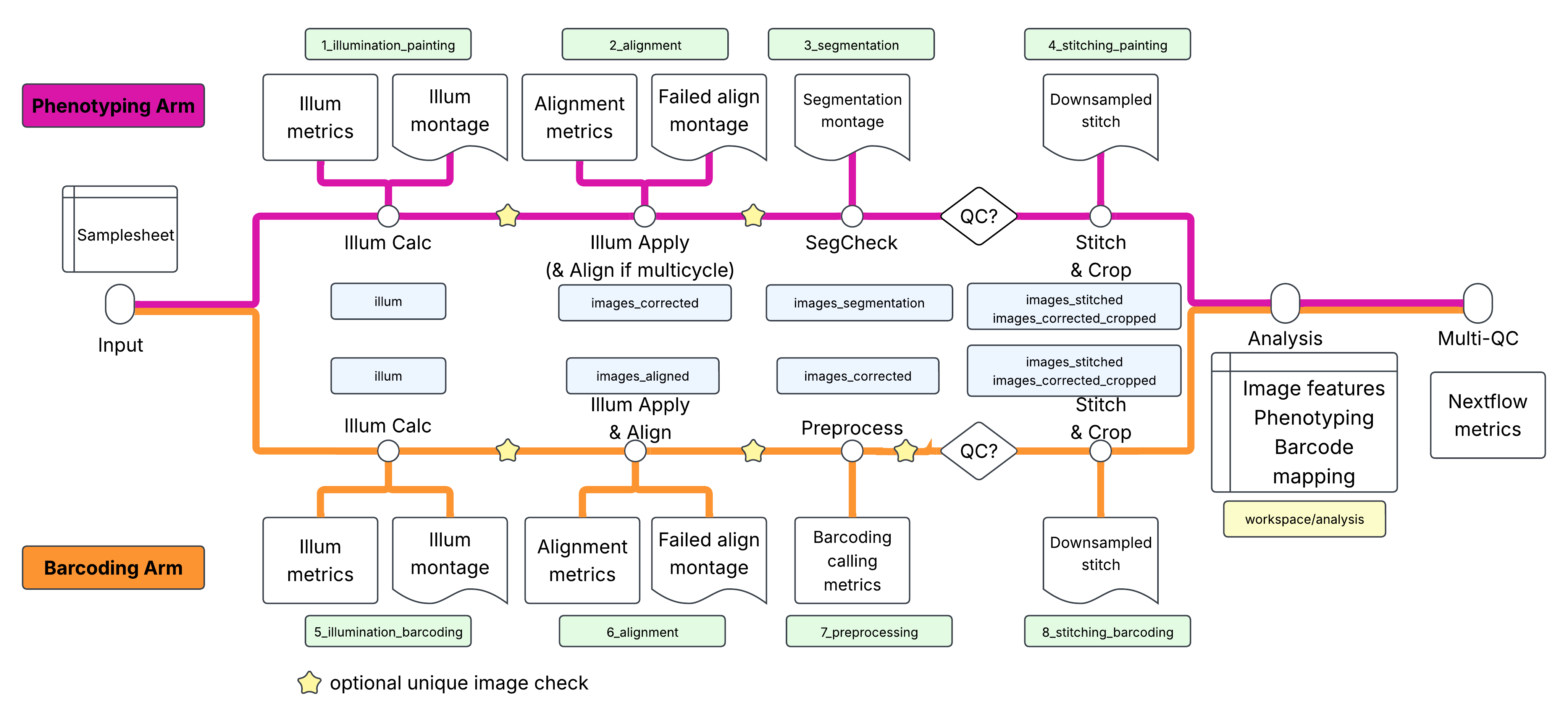
results/
├── images/
│   └── {batch}/
│       ├── illum/                          # Illumination functions
│       ├── images_corrected/               # Illumination-corrected images, intra-arm aligned, channel balanced if 4-color SBS chemistry
│       ├── images_aligned/                 # Aligned barcoding images
│       ├── images_segmentation/            # Segmentation check outputs
│       ├── images_corrected_stitched/      # Stitched images (default only)
│       ├── images_corrected_cropped/       # Cropped images (default only)
│       └── images_corrected_stitched_10X/  # 10X downsampled stitched images (default only)
├── workspace/
│   ├── analysis/                           # Combined analysis outputs
│   └── qc_reports/                         # Quality control reports
├── multiqc/                                # MultiQC summary reports
└── pipeline_info/                          # Nextflow execution reports and metadata
Stitch-Align-Crop workflow
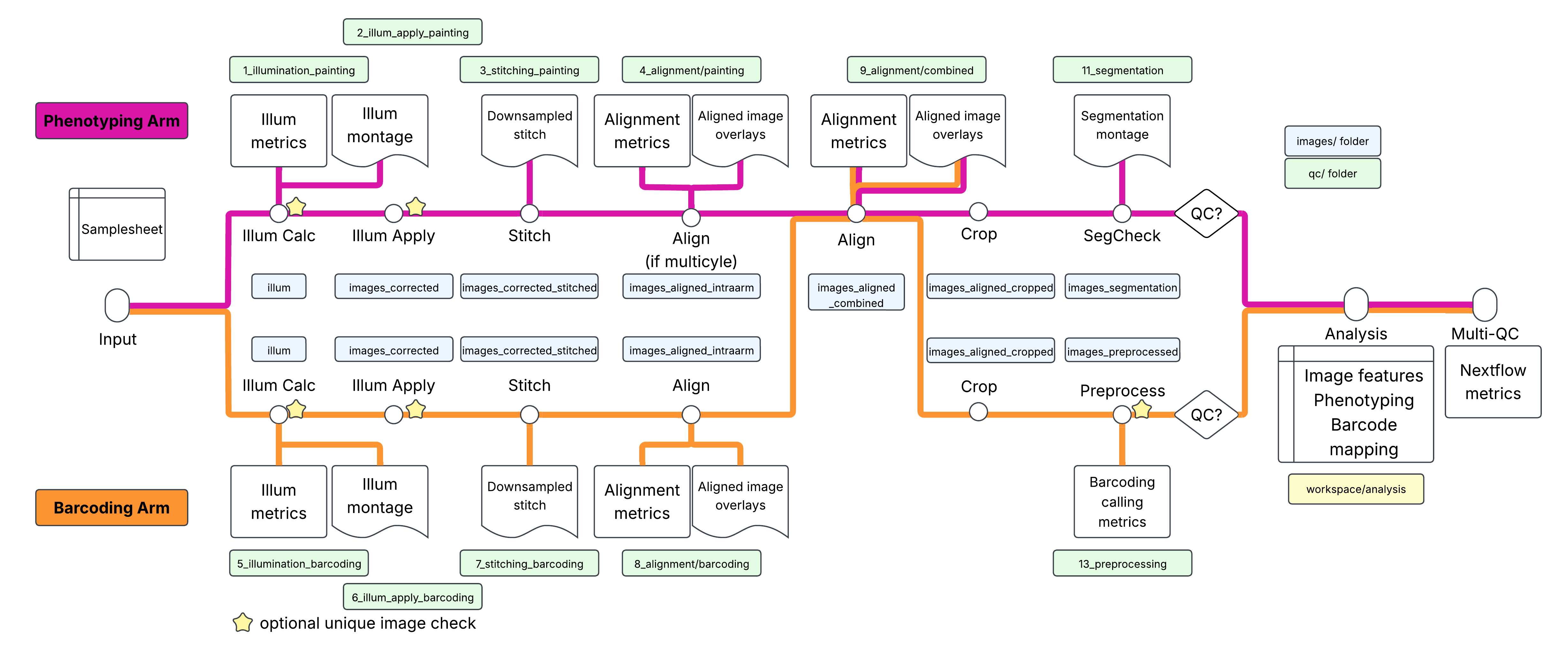
results/
├── images/
│   └── {batch}/
│       ├── illum/                          # Illumination functions
│       ├── images_corrected/               # Illumination-corrected images
│       ├── images_corrected_stitched/      # Stitched images
│       └── images_corrected_stitched_10X/  # 10X downsampled stitched images
│       ├── images_aligned_intraarm/        # Cross-cycle aligned images
│       ├── images_aligned_combined/        # Cross-arm aligned images
│       ├── images_aligned_cropped/         # Cropped images
│       ├── images_preprocessed/            # Preprocessed barcoding images (STITCH_ALIGN_CROP only)
│       └── images_segmentation/            # Segmentation check outputs
├── workspace/
│   ├── analysis/                           # Combined analysis outputs
│   └── qc_reports/                         # Quality control reports - numbering
├── multiqc/                                # MultiQC summary reports
└── pipeline_info/                          # Nextflow execution reports and metadata
Cell Painting Outputs
Illumination Functions
Location: results/images/{batch}/illum/{plate}/
Files: {plate}_Illum{channel}.npy
Description: NumPy arrays containing illumination correction functions for each channel. Used to correct uneven illumination across the field of view.
Example:
results/images/Batch1/illum/Plate1/
  Plate1_IllumDAPI.npy
  Plate1_IllumGFP.npy
  Plate1_IllumRFP.npy
Corrected Images
Location: results/images/{batch}/images_corrected/painting/{plate}/{plate}-{well}-{site}/
Files: Plate_{plate}_Well_{well}_Site_{site}_Corr{channel}.tiff
Description: Multi-frame TIFF images with illumination correction applied. One file per channel per site.
Example:
results/images/Batch1/images_corrected/painting/Plate1/Plate1-A1-1/
  Plate_Plate1_Well_A1_Site_1_CorrDAPI.tiff
  Plate_Plate1_Well_A1_Site_1_CorrGFP.tiff
  Plate_Plate1_Well_A1_Site_1_CorrRFP.tiff
Segmentation Check
Location: results/images/{batch}/images_segmentation/painting/{plate}/{plate}-{well}/
Files: Segmentation preview images (*.png) and CSV summaries
Description: QC outputs from the segmentation check step.
Stitched Images
Location: results/images/{batch}/images_corrected_stitched/painting/{plate}/{plate}-{well}/
Files: *.tiff, TileConfiguration.txt
Description: Stitched full-resolution images for each well. Default entrypoint: generated only if qc_painting_passed == true, and includes the FIJI TileConfiguration file for reference. STITCH_ALIGN_CROP: always generated (not gated by qc_painting_passed), stitched with ashlar from the illumination-corrected images, one file per well, cycle and channel named Plate_{plate}_Well_{well}_Site_1_Stitched_Cycle{NN}_Corr{channel}.tiff (no TileConfiguration file).
Cropped Images
Location: results/images/{batch}/images_corrected_cropped/painting/{plate}/{plate}-{well}/ (default) or results/images/{batch}/images_aligned_cropped/painting/{plate}/{plate}-{well}/ (STITCH_ALIGN_CROP - by this point the images have gone through cross-cycle/cross-arm alignment, not just illumination correction)
Files: *.tiff
Description: Cropped images with overlap regions removed.
10X Downsampled Images
Location: results/images/{batch}/images_corrected_stitched_10X/painting/{plate}/{plate}-{well}/
Files: *.tiff
Description: Downsampled versions of stitched images for quick visualization (every 10th pixel in STITCH_ALIGN_CROP).
Barcoding Outputs
Aligned Images
Location: results/images/{batch}/images_aligned/barcoding/{plate}/{plate}-{well}/
Files: *.tiff
Description: Illumination-corrected and aligned barcoding images.
Preprocessed Images
Location: results/images/{batch}/images_corrected/barcoding/{plate}/{plate}-{well}-{site}/ (default, NO_STITCH) or results/images/{batch}/images_preprocessed/barcoding/{plate}/{plate}-{well}-{site}/ (STITCH_ALIGN_CROP - this entrypoint preprocesses after stitch/align/crop, so it’s kept under its own folder name rather than images_corrected)
Files: Plate_{plate}_Well_{well}_Site_{site}_Cycle{cycle}_{channel}.tiff, plus an optional ..._FociObjects.tiff (a per-site Foci object/label image, produced only if the barcoding preprocessing pipeline includes a module that saves it; STITCH_ALIGN_CROP only)
Description: Barcode-called and color-compensated images. In the default and NO_STITCH entrypoints these are ready for stitching/combined analysis; in STITCH_ALIGN_CROP they are produced from the already stitched, aligned and cropped tiles. In STITCH_ALIGN_CROP, the optional FociObjects.tiff is also made available to combined analysis (see below).
Stitched Images
Location: results/images/{batch}/images_corrected_stitched/barcoding/{plate}/{plate}-{well}/
Files: *.tiff, TileConfiguration.txt
Description: Default entrypoint: stitched preprocessed barcoding images, generated only if qc_barcoding_passed == true. STITCH_ALIGN_CROP: always generated (not gated by qc_barcoding_passed), stitched with ashlar from the illumination-corrected images, one file per well, cycle and channel named Plate_{plate}_Well_{well}_Site_1_Stitched_Cycle{NN}_{channel}.tiff (no TileConfiguration file).
Cropped Images
Location: results/images/{batch}/images_corrected_cropped/barcoding/{plate}/{plate}-{well}/ (default) or results/images/{batch}/images_aligned_cropped/barcoding/{plate}/{plate}-{well}/ (STITCH_ALIGN_CROP)
Files: *.tiff
Description: Cropped barcoding images with overlap regions removed.
Combined Analysis Outputs
This is where the final, most valuable outputs live. The combined analysis merges Cell Painting phenotype data with barcoding genotype data.
Location: results/workspace/analysis/{batch}/{plate}-{well}-{site}/
Segmentation Masks
Files:
segmentation_masks/
  {plate}_{well}_{site}_Nuclei.tiff
  {plate}_{well}_{site}_Cells.tiff
{plate}_{well}_{site}_Cytoplasm.tiffDescription: Binary masks for segmented objects:
Nuclei: Nuclear segmentation
Cells: Whole cell segmentation
Cytoplasm: Cytoplasm only (Cells - Nuclei)
Feature Measurements
Files:
| File | Description |
|---|---|
Image.csv | Per-image measurements (counts, metadata) |
Nuclei.csv | Per-nucleus measurements (location, intensity, texture) |
Cells.csv | Per-cell measurements |
Cytoplasm.csv | Per-cytoplasm measurements |
Experiment.csv | Pipeline metadata |
Description: CSV files containing extracted features and measurements.
Image.csv
Per-image measurements, including:
| Column | Description |
|---|---|
ImageNumber | Unique image identifier |
Metadata_Plate | Plate identifier |
Metadata_Well | Well position |
Metadata_Site | Site number |
Count_Nuclei | Number of nuclei detected |
Count_Cells | Number of cells detected |
Nuclei.csv / Cells.csv
Per-object measurements, including:
| Column | Description |
|---|---|
ObjectNumber | Unique object ID within image |
ImageNumber | Reference to Image.csv |
Metadata_Barcode | Assigned barcode sequence |
Location_Center_X | X coordinate of object center |
Location_Center_Y | Y coordinate of object center |
AreaShape_Area | Object area in pixels |
Intensity_MeanIntensity_* | Mean intensity per channel |
Texture_* | Texture features |
Granularity_* | Granularity features |
Experiment.csv
Pipeline metadata and run parameters.
STITCH_ALIGN_CROP Intermediate Images
Only produced by the STITCH_ALIGN_CROP entrypoint, between stitching and cropping.
Cross-cycle Aligned Images
Location: results/images/{batch}/images_aligned_intraarm/{arm}/{plate}/{plate}-{well}/
Files: full-well stitched *.tiff, one per cycle and channel
Description: Each cycle is registered to the first cycle of its arm (phase cross-correlation on the painting_channame / barcoding_channame reference channel), and the same shift is applied to every channel in that cycle. If only one cycle is present the images pass through unchanged. Alignment stats and QC overlays are written to qc_reports/{batch}/4_alignment/painting/ and 8_alignment/barcoding/.
Cross-arm Aligned Images
Location: results/images/{batch}/images_aligned_combined/{painting|barcoding}/{plate}/{plate}-{well}/
Files: full-well *.tiff for each arm
Description: Painting and barcoding images are scaled to a common pixel size (painting_scalingstring, barcoding_scalingstring), then painting is registered to barcoding cycle 1. The shift is applied to every painting image; barcoding images are scaled but not shifted. Stats and a QC overlay are written to qc_reports/{batch}/9_alignment/combined/.
Quality Control Outputs
QC reports are numbered to reflect the pipeline execution order, making it easy to review them sequentially. The numbering differs by entrypoint - the default and NO_STITCH entrypoints share one scheme, while STITCH_ALIGN_CROP uses a different one (alignment happens after stitching there, and preprocessing/segmentation happen much later, after crop).
Location: results/workspace/qc_reports/{batch}/
Default and NO_STITCH entrypoints
| Directory | Description | Files | Entrypoints |
|---|---|---|---|
1_illumination_painting/ | Painting illumination correction montages | *.png montages | default, NO_STITCH, STITCH_ALIGN_CROP |
2_alignment/ | Alignment for multicycle painting | *.html, *.ipynb | default, NO_STITCH |
3_segmentation/ | Segmentation QC with overlays | *.png montages | default, NO_STITCH |
4_stitching_painting/ | Painting stitching QC | *.png montages | default only |
5_illumination_barcoding/ | Barcoding illumination correction montages | *.png montages | default, NO_STITCH, STITCH_ALIGN_CROP |
6_alignment/ | Barcode alignment reports | *.html, *.ipynb, *.png | default, NO_STITCH |
7_preprocessing/ | Barcoding preprocessing QC | *.html, *.ipynb, *.png | default, NO_STITCH |
8_stitching_barcoding/ | Barcoding stitching QC | *.png montages | default only |
STITCH_ALIGN_CROP entrypoint
Stitching/alignment happen immediately after illumination correction here (before segmentation/preprocessing, which run later on cropped tiles), so this entrypoint numbers its qc_reports subfolders differently:
| Directory | Description | Files |
|---|---|---|
1_illumination_painting/ | Painting illumination correction montages | *.png montages |
2_illum_apply_painting/ | Duplicate-image check on illumination-applied painting images | *.txt |
3_stitching_painting/ | Painting stitching QC | *.png montages |
4_alignment/painting/ | Cross-cycle alignment QC (painting, per well) | *.png, *.csv |
5_illumination_barcoding/ | Barcoding illumination correction montages | *.png montages |
6_illum_apply_barcoding/ | Duplicate-image check on illumination-applied barcoding images | *.txt |
7_stitching_barcoding/ | Barcoding stitching QC | *.png montages |
8_alignment/barcoding/ | Cross-cycle alignment QC (barcoding, per well) | *.png, *.csv |
9_alignment/combined/ | Cross-arm (painting-to-barcoding) alignment QC, per well | *.png, *.csv |
11_segmentation/ | Segmentation QC with overlays (post-crop) | *.png montages |
13_preprocessing/ | Barcoding preprocessing QC (post-crop) + duplicate-image check | *.html, *.ipynb, *.png, *.txt |
MultiQC Reports
Location: results/multiqc/
Files:
multiqc_report.html: Interactive HTML report aggregating all QC metricsmultiqc_data/: Raw data and plot datamultiqc_plots/: Exported plot files
Description: Aggregated summary of pipeline execution metrics and QC results.
Pipeline Information
Location: results/pipeline_info/
The pipeline automatically generates execution reports and metadata in this folder.
| File | Description |
|---|---|
execution_report_*.html | Resource usage and task statistics |
execution_timeline_*.html | Timeline visualization of task execution |
execution_trace_*.txt | Detailed execution log with per-task metrics |
pipeline_dag_*.html | Interactive DAG visualization |
params_*.json | Parameters used for the run |
nf-pooled-cellpainting_software_mqc_versions.yml | Software versions |
Execution Reports
Files:
execution_report_*.html: Resource usage and task statisticsexecution_timeline_*.html: Timeline visualization of task executionexecution_trace_*.txt: Detailed execution log with per-task metricspipeline_dag_*.html: Interactive DAG visualization of the workflow
Description: These files are automatically generated by Nextflow and include timestamps in their filenames. They provide detailed insights into pipeline performance, resource consumption, and task dependencies.
Pipeline Metadata
Files:
params_*.json: JSON file containing all parameters used for the runnf-pooled-cellpainting_software_mqc_versions.yml: Software versions used by the pipelinepipeline_report.html/pipeline_report.txt: Summary report of the pipeline run
Description: These metadata files help with reproducibility by recording the exact configuration and software versions used.