Technical overview of the pipeline architecture and implementation.
Workflow Design
Main Workflow
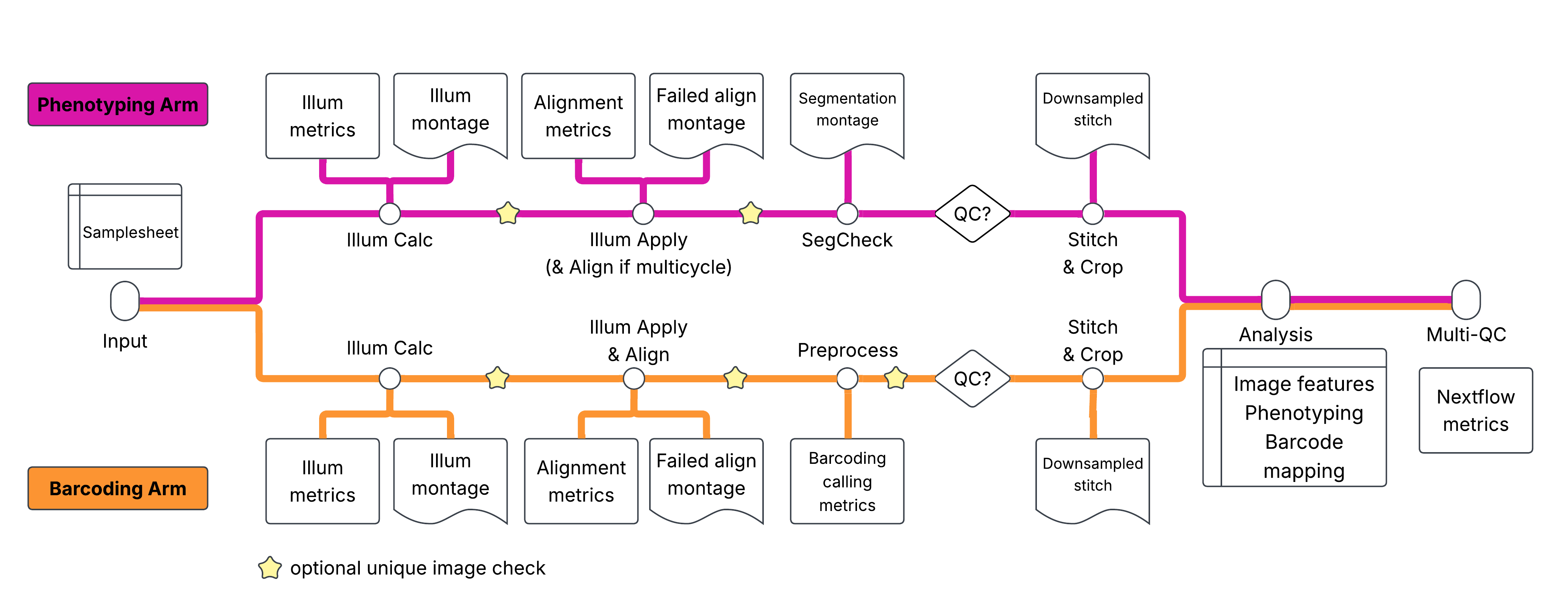
The main workflow (workflows/nf-pooled-cellpainting.nf) orchestrates the pipeline execution:
Subworkflow Execution: Runs CELLPAINTING and BARCODING subworkflows in parallel
Combined Analysis: Merges outputs from both arms (conditional on QC gates)
MultiQC Report: Generates unified QC report (conditional on QC gates)
This describes the default entrypoint. See Alternative Entrypoints for NO_STITCH and STITCH_ALIGN_CROP.
Cell Painting Subworkflow
Located in subworkflows/local/cellpainting/main.nf. The workflow is organized into three logical phases:
Phase 1: Illumination Correction
| Process | Description | Grouping |
|---|---|---|
| ILLUMCALC | Calculate illumination corrections per plate | [batch, plate] |
| QC_MONTAGEILLUM | Generate illumination QC montages | |
| ILLUMAPPLY | Apply illumination corrections per site | [batch, plate, well, site] |
Phase 2: Segmentation Quality Control
| Process | Description | Grouping |
|---|---|---|
| SEGCHECK | Segmentation quality check (subsampled by range_skip) | [batch, plate, well] |
| QC_MONTAGE_SEGCHECK | Segmentation QC visualizations |
Phase 3: Image Stitching (Conditional)
| Process | Description | Grouping |
|---|---|---|
| FIJI_STITCHCROP | Stitch and crop images (enabled when qc_painting_passed) | [batch, plate, well] |
| QC_MONTAGE_STITCHCROP | Stitching QC visualizations |
Barcoding Subworkflow
Located in subworkflows/local/barcoding/main.nf. Organized into three logical phases:
Phase 1: Illumination Correction
| Process | Description | Grouping |
|---|---|---|
| ILLUMCALC | Calculate cycle-specific illumination corrections | [batch, plate, cycle] |
| QC_MONTAGEILLUM | Illumination QC montages | |
| ILLUMAPPLY | Apply illumination corrections | [batch, plate, well] |
Phase 2: Barcode Quality Control and Preprocessing
| Process | Description | Grouping |
|---|---|---|
| QC_BARCODEALIGN | Barcode alignment QC (reports shifts/correlations against thresholds) | |
| PREPROCESS | Barcode calling and preprocessing | [batch, plate, well, site] |
| QC_PREPROCESS | Preprocessing QC visualizations |
Phase 3: Image Stitching (Conditional)
| Process | Description | Grouping |
|---|---|---|
| FIJI_STITCHCROP | Stitch and crop images (enabled when qc_barcoding_passed == true) | [batch, plate, well] |
Combined Analysis (Conditional)
Located in modules/local/cellprofiler/combinedanalysis/main.nf. Executes when both qc_painting_passed and qc_barcoding_passed are true.
Inputs: Combines cropped images from both arms, grouped by [batch, plate, well, site]:
From Cell Painting: Corrected images (
CorrDNA,CorrPhalloidin,CorrCHN2, etc.)From Barcoding: Preprocessed cycle images (
Cycle##_A,Cycle##_C,Cycle##_G,Cycle##_T,Cycle##_DNA)
Outputs:
Overlay images (PNG) showing segmentation results
CSV statistics for Nuclei, Cells, Cytoplasm, Foci measurements
Segmentation masks (TIFF)
Consolidated
load_data.csvfor all samples
Alternative Entrypoints
Selected with -entry (defined in main.nf).
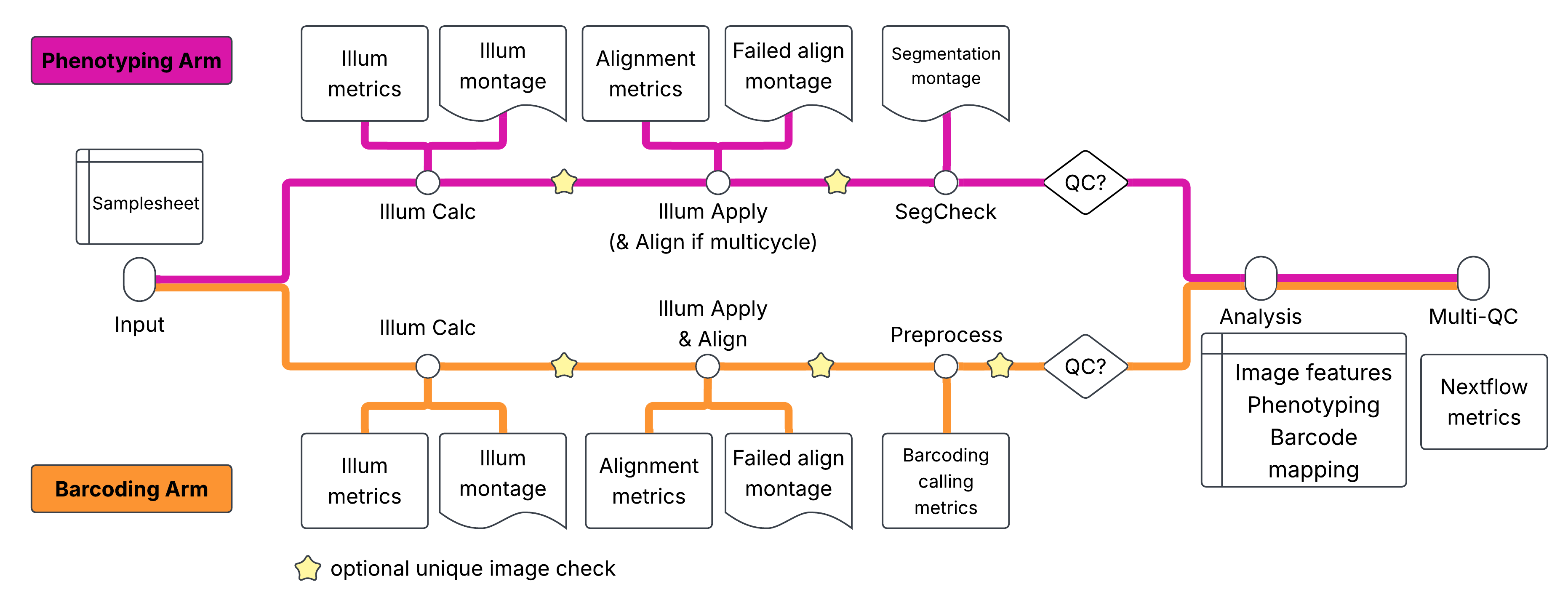
NO_STITCH (workflows/no-stitch.nf, subworkflows/local/{cellpainting,barcoding}_no_stitch): same as the default workflow without the FIJI_STITCHCROP phase; combined analysis runs on the per-site images.
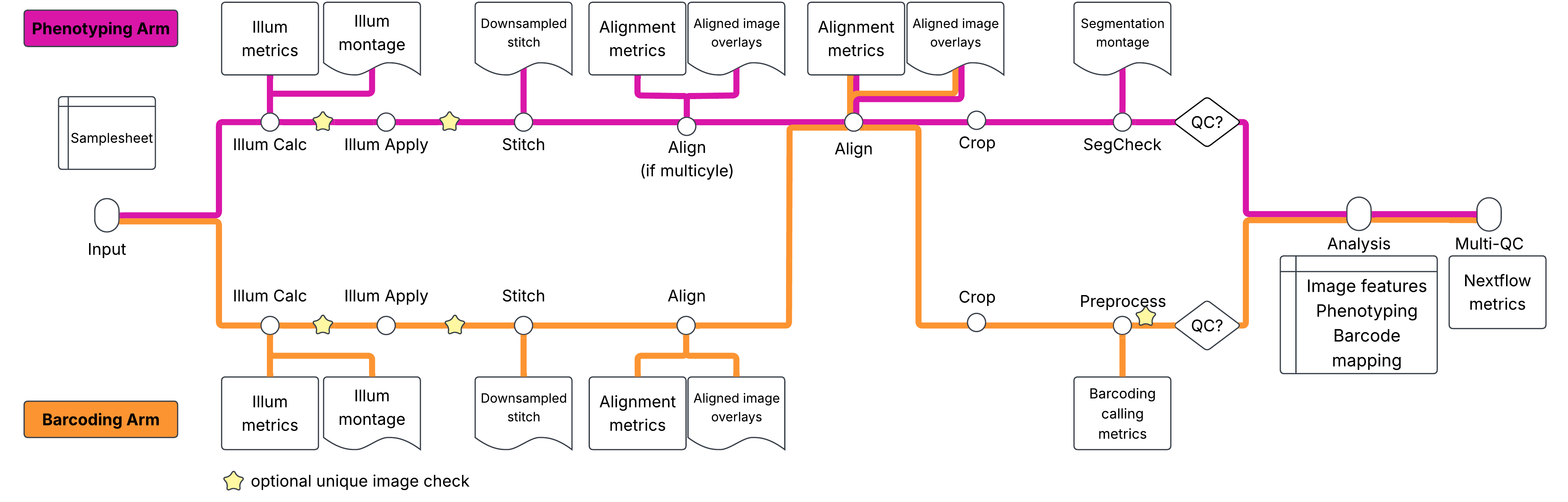
STITCH_ALIGN_CROP (workflows/stitch-align-crop.nf): stitching, alignment and cropping happen before segmentation check and barcode preprocessing. Stitch/align/crop are not gated; only combined analysis requires both QC flags.
| Stage | Process / subworkflow | Grouping |
|---|---|---|
| Illumination correction | CELLPAINTING_PRE_STITCH, BARCODING_PRE_STITCH (ILLUMCALC, ILLUMAPPLY, optional duplicate check) | [batch, plate], [batch, plate, well, site] |
| Stitch (ashlar) | STITCH (one task per well and cycle, per arm) | [batch, plate, well, cycle] |
| Align within arm | ALIGN_INTRAARM (cycles aligned to the first cycle; pass-through if one cycle) | [batch, plate, well] |
| Align across arms | ALIGN_COMBINED (scale, then register painting to barcoding cycle 1) | [batch, plate, well] |
| Crop | CROP (per arm) | [batch, plate, well] |
| QC / preprocessing | CELLPROFILER_SEGCHECK, CELLPROFILER_PREPROCESS, QC_PREPROCESS on cropped tiles | [batch, plate, well], [batch, plate, well, site] |
| Combined analysis | CELLPROFILER_COMBINEDANALYSIS (painting images, plus optional FociObjects.tiff; barcoding images only if combinedanalysis_include_barcoding_images) | [batch, plate, well, site] |
The stitch/align/crop logic lives in subworkflows/local/stitch_align_crop/main.nf; the scripts are described in Python Scripts.
MultiQC Report (Conditional)
Located in modules/nf-core/multiqc/main.nf. Executes when both qc_painting_passed and qc_barcoding_passed are true.
Aggregated Inputs
Software versions from all processes
Workflow summary parameters
Methods description
Outputs
multiqc_report.html: Interactive HTML reportmultiqc_data/: Raw data and plot datamultiqc_plots/: Exported plot files
Configuration is defined in assets/multiqc_config.yml.
Channel Architecture
Data Flow
Nextflow channels carry metadata and file references.
[meta, files]Where meta contains:
meta = [
    batch: 'batch1',
    plate: 'P001',
    well: 'A01',
    site: 1,
    cycle: 1,          // barcoding only
    channels: ['DAPI', 'GFP', 'RFP'],
    n_frames: 4,
    arm: 'painting'
]
Grouping Strategy
During the workflow execution, the input channels are grouped based on the parallelization granularity we chose for each pipeline step. The channel grouping is implemented throughout workflow and subworkflows. Below is an example of what this grouping looks like in Nextflow.
// Group images by batch and plate for illumination calculation
// Keep metadata for each image to generate load_data.csv
ch_illumcalc_input = ch_samplesheet_cp
    .map { meta, image ->

        def group_id = "${meta.batch}_${meta.plate}"
        def group_key = meta.subMap(['batch', 'plate']) + [id: group_id]

        // Preserve full metadata for each image
        def image_meta = meta + [filename: image.name]
        [group_key, image_meta, image]
    }
    .groupTuple()
    .map { meta, images_meta_list, images_list ->
        def all_channels = images_meta_list[0].channels
        // Return tuple: (shared_meta, channels, cycles, images, per-image metadata)
        [meta, all_channels, null, images_list, images_meta_list]
    }
We specifically pass along the per-image metadata to the illumination correction process to efficiently generate the load_data.csv file within the process script block. These channel rewirings will look different depending on the grouping that is desired. A concrete example of two different levels of parallelization is implemented for CELLPROFILER_ILLUMAPPLY_BARCODING, which can be parallelized at the site or well level, which is controlled by a parameter (--barcoding_illumapply_grouping):
// Group images for ILLUMAPPLY based on parameter setting
// Two modes:
//   - "site": Group by site - each site is processed separately
//   - "well": Group by well (default) - all sites in a well are processed together
// Site information is always preserved in image metadata for downstream preprocessing
ch_images_by_site = ch_samplesheet_sbs
    .map { meta, image ->
        // Determine grouping key based on parameter
        def group_key
        def group_id

        if (barcoding_illumapply_grouping == "site") {
            // Site-level grouping
            group_key = meta.subMap(['batch', 'plate', 'well', 'site', 'arm'])
            group_id = "${meta.batch}_${meta.plate}_${meta.well}_Site${meta.site}"
        }
        else {
            // Well-level grouping (default)
            // Site is NOT in the grouping key, but preserved in image metadata
            group_key = meta.subMap(['batch', 'plate', 'well', 'arm'])
            group_id = "${meta.batch}_${meta.plate}_${meta.well}"
        }

        // Preserve full metadata for each image (including site)
        def image_meta = meta.clone()
        image_meta.filename = image.name

        [group_key + [id: group_id], image_meta, image]
    }
    .groupTuple()
    .map { group_meta, images_meta_list, images_list ->
        // Get unique cycles and channels for this group
        // For barcoding, we expect multiple cycles
        def all_cycles = images_meta_list.collect { m -> m.cycle }.findAll { c -> c != null }.unique().sort()
        def unique_cycles = all_cycles.size() > 1 ? all_cycles : null
        def all_channels = images_meta_list[0].channels

        // Return tuple: (shared meta, channels, cycles, images, per-image metadata)
        [group_meta, all_channels, unique_cycles, images_list, images_meta_list]
    }
Process Design
Standard Process Structure
process EXAMPLE_PROCESS {
    tag "${meta.batch}_${meta.plate}_${meta.well}"
    label 'process_medium'
    container 'wave.seqera.io/cellprofiler/cellprofiler:4.2.8'

    input:
    tuple val(meta), path(images)
    path(cppipe)

    output:
    tuple val(meta), path("output/*"), emit: images
    path("*.csv"), emit: csv

    script:
    """
    # Generate load_data.csv
    generate_load_data_csv.py \\
        --metadata-json metadata.json \\
        --images-dir ./images \\
        --output load_data.csv

    # Run CellProfiler
    cellprofiler \\
        -c -r \\
        -p ${cppipe} \\
        -o output/ \\
        --data-file=load_data.csv
    """
}
Key Conventions
Tagging: Use image metadata for process identification (allows easier understanding which site / well / plate is being processed by a task)
Labels: Apply resource labels to specify resource needs (
qc,cellprofiler_basic,cellprofiler_medium,fiji)Containers: Specify container images explicitly
Output channels: Name channels with
emit:Scripts: Use Python helper script to generate load_data.csv for cellprofiler processes
QC Gate Implementation
Conditional Execution
As previously described, there are two parameters that control progression of the painting and barcoding arms: qc_painting_passed and qc_barcoding_passed. These parameters are false by default and can be set to true if the QC checks have passed or if the user is certain that the images and QC are of high quality.
if (params.qc_painting_passed) {
    FIJI_STITCHCROP(
        CELLPROFILER_ILLUMAPPLY.out.corrected,
        ...
    )
}
Importantly, only setting if else statements to control the gating behaviour is not sufficient because Nextflow uses the dataflow paradigm and will still process all sites / wells / plates even if the QC checks fail. To prevent this, we use the when parameter inside the FIJI_STITCHCROP process to control the execution of the process. This when parameter will only let the process be executed if the qc_painting_passed or qc_barcoding_passed parameter respectively are set to true.
process FIJI_STITCHCROP {
    when:
    params.qc_painting_passed  // or params.qc_barcoding_passed
    // ...
}
Manual Review Workflow
Run pipeline with default QC parameters (
false)Pipeline stops after initial QC checks
Review QC outputs in
results/qc/Re-run with
--qc_painting_passed trueif QC passesPipeline resumes from cached results (
-resume)
Data Staging
Load Data CSV Generation
All CellProfiler processes require load_data.csv files:
generate_load_data_csv.py \
    --metadata-json metadata.json \
    --images-dir ./images \
    --output load_data.csv
The same script serves every CellProfiler module (illumcalc, illumapply, segcheck, preprocess, combinedanalysis); the calling Nextflow module builds the metadata JSON and sets the optional flags (--has-cycles, --include-illum-files, --range-skip). See Python Scripts.
For more details about the load_data.csv file, see the Cellprofiler Integration document.
Plugin Integration
CellProfiler Plugins
Cellprofiler plugins are downloaded and staged by Nextflow from the Cellprofiler plugin repository by default: nextflow.config
Error Handling
Retry Strategy
Error and retry strategies are defined in the base.config file in the /conf directory. The pipeline supports retrying failed processes in case of insufficient memory or other defined error codes. The specific parameters and exit codes for retry behaviour can be modified via nextflow configuration:
base.config
process {
    errorStrategy = { task.exitStatus in ((130..145) + 104 + 175) ? 'retry' : 'finish' }
    maxRetries    = 1
    maxErrors     = '-1'
}
Exit codes 130-145, 104, and 175 trigger automatic retry with increased resources.